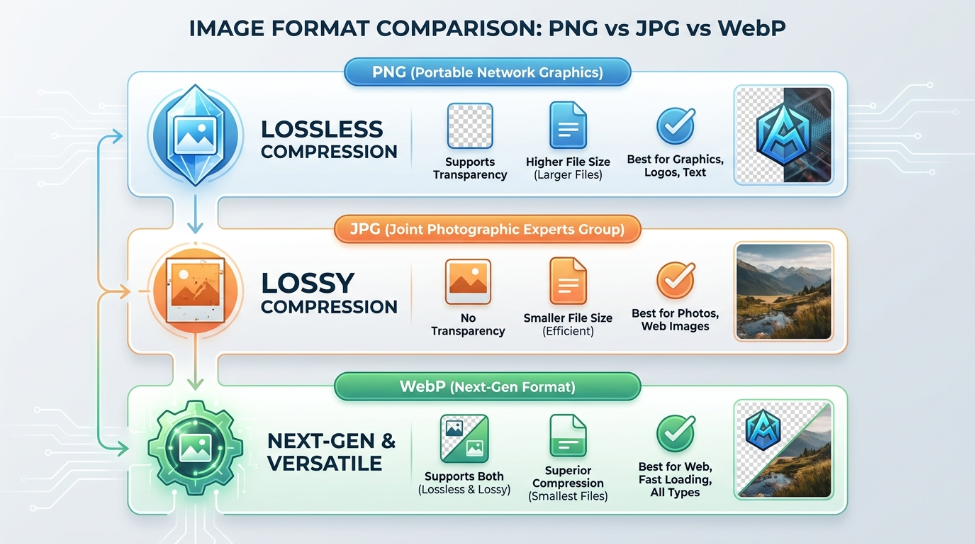
Choosing the correct image format directly influences website speed, user experience, and storage capacity. With multiple formats available today—ranging from classic JPEGs to modern WebP and AVIF files—understanding their core strengths prevents slow page loading and blurry visuals.
1. JPEG (Joint Photographic Experts Group)
JPEG remains the standard for photographic imagery across the internet. It utilizes lossy compression algorithms designed specifically to handle complex color gradients and rich photography.
- Best For: High-resolution photos, product displays, and complex graphics with subtle color transitions.
- Downsides: Does not support transparency (alpha channels) and loses crispness around text edges when compressed aggressively.
2. PNG (Portable Network Graphics)
PNG was developed to provide lossless compression with complete transparency support. Unlike JPEG, saving a PNG multiple times never degrades image quality.
- Best For: Logos, brand icons, user interface screenshots, and graphics requiring transparent backgrounds.
- Downsides: File sizes can be significantly heavier than JPEG or WebP when storing high-resolution photography.
3. WebP: The Modern Web Standard
Developed by Google, WebP has become the preferred standard for digital workflows. WebP provides both lossy and lossless compression while supporting full alpha transparency.
- Performance: WebP files are typically 25% to 35% smaller than comparable JPEGs and PNGs without noticeable quality loss.
- Compatibility: Universally supported across all modern web browsers and mobile operating systems.
Quick Selection Reference
- Need transparency or UI icons? Choose PNG (or Lossless WebP).
- Handling large photo albums? Choose WebP or JPEG.
- Optimizing web loading speed? Convert existing assets to WebP using lightweight browser converters.
Summary
Selecting the proper file format before publishing or sharing documents minimizes bandwidth consumption while preserving sharp visual fidelity across all screens.
Comments (0)
Leave a Comment